CodeFire is the desktop command center for agencies and teams running AI coding agents. Team chat with your agents, orchestration across every project, client-ready reporting, and shared memory — one place for Claude Code, Codex, Kimi Code, and the CodeFire Agent to work like a team.
Stop juggling clients.
Start shipping with an agent workforce.
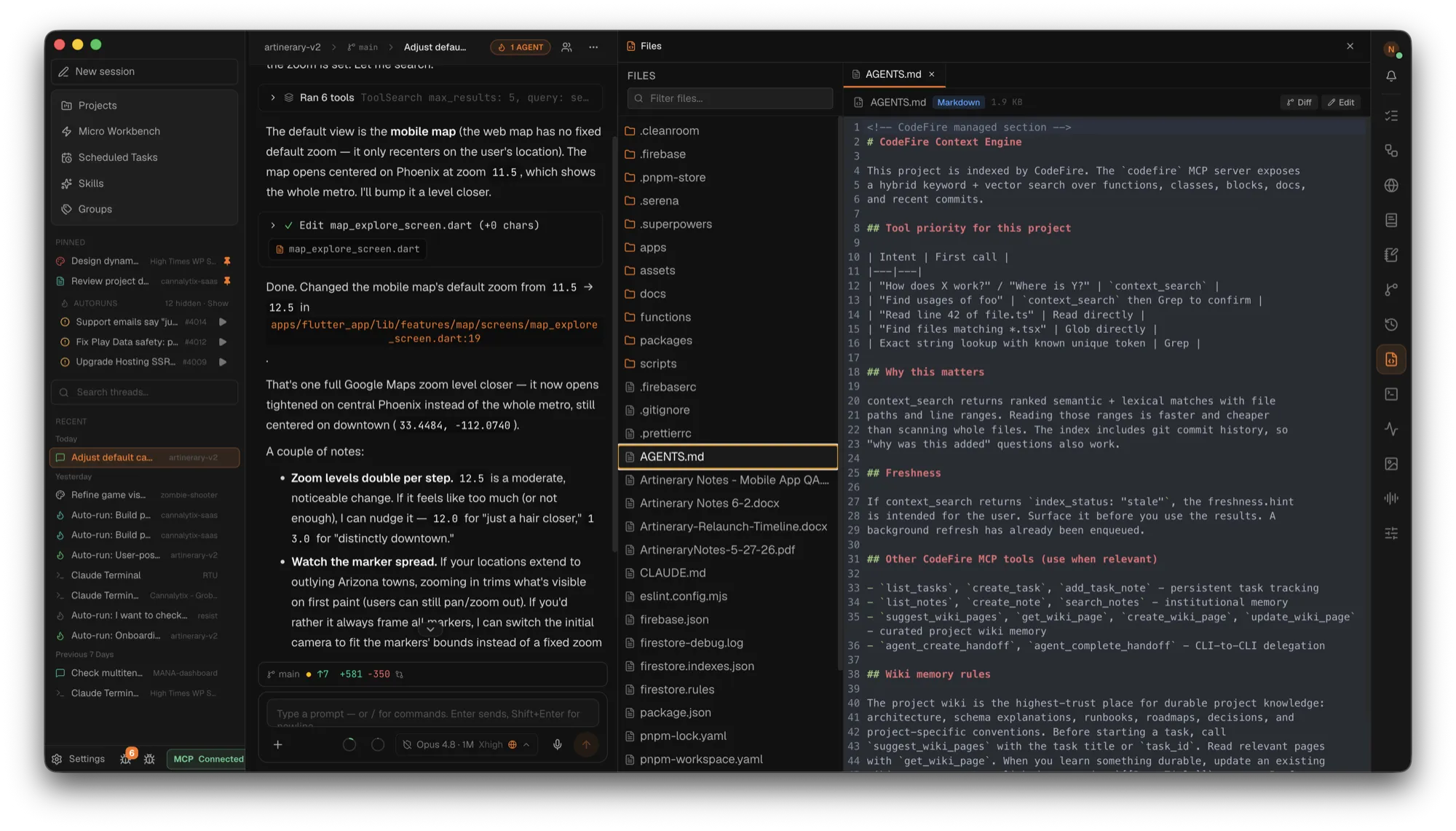
A chat-first shell built for client work. Your team's conversation with its agents stays front and center while a rail of dockable tools — Tasks, Workflows, Browser, Wiki, Notes, Git, Sessions, Files, Terminal, Activity, Reports — opens beside it or tears off into floating windows. Four CLIs, every client project, shared memory.
◉
Team chat with agents
Channels where you @mention agents and work routes itself — runs, approvals, and threads inline.
▦
Agent teams & orchestration
Custom agents grouped under one @handle — relay or parallel — plus pipelines and cross-CLI handoffs.
⌘
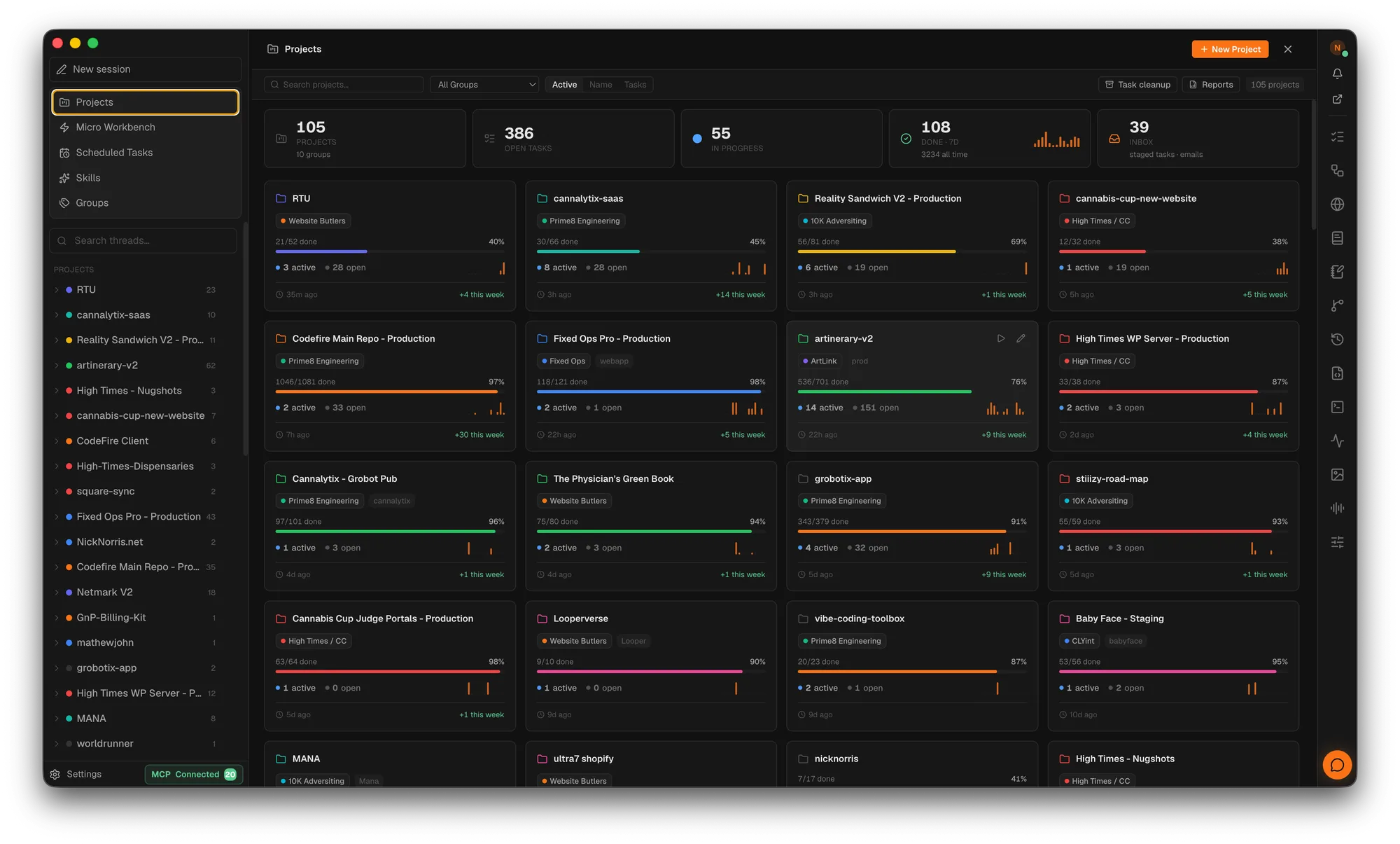
Multi-client command center
Group projects by client, watch every live agent, and keep every board moving from one dashboard.
◐
Client reporting & memory
Branded PDF reports and invoices from completed work — backed by wiki memory agents keep fresh.
Chapter II · Team Chat
Mention an agent. Workhappens.
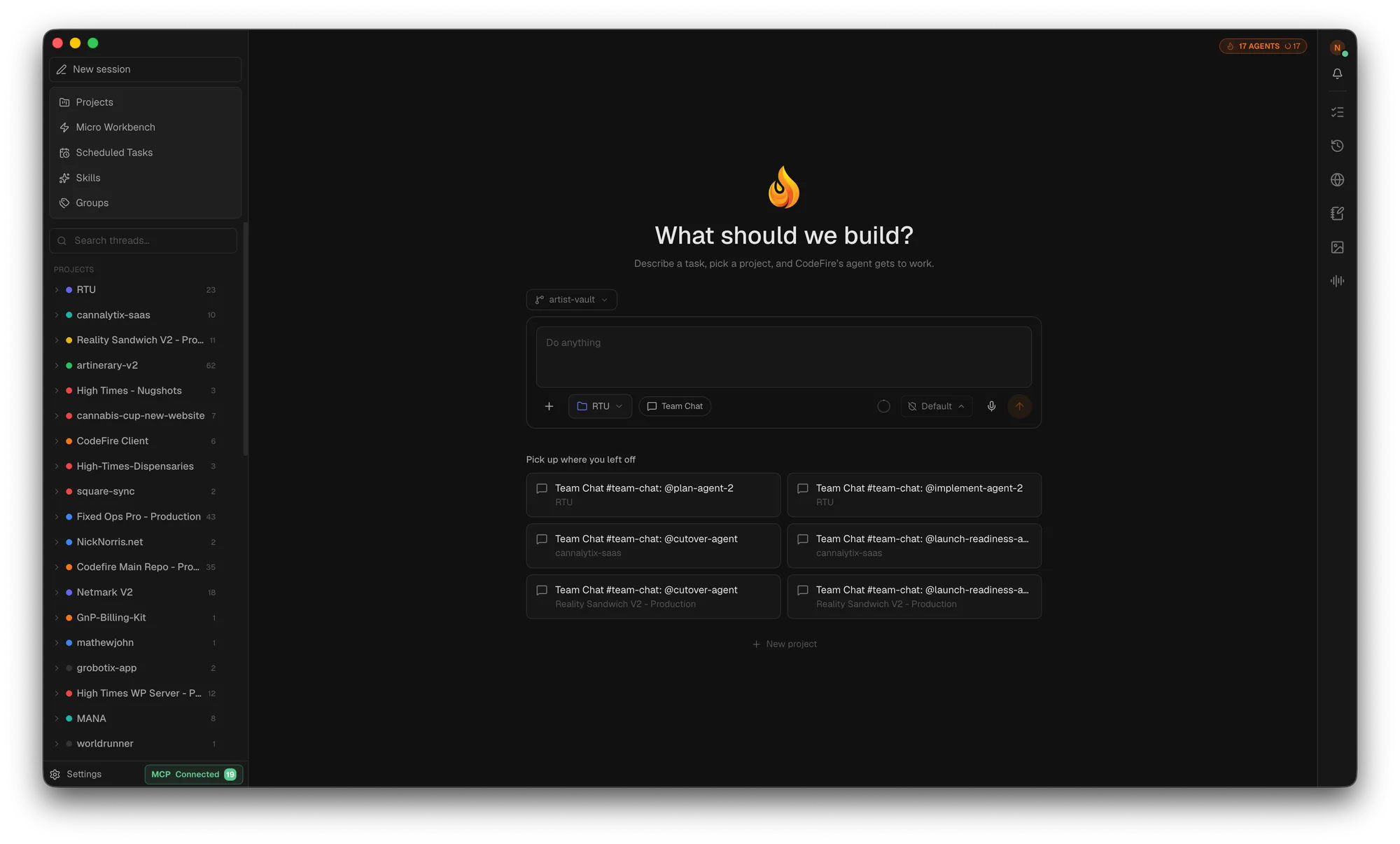
Every project gets Slack-style channels where humans and agents share the room. @mention an agent — or a whole agent team — and CodeFire routes the work, tracks it as a task, and posts the live run right in the conversation.
@
Route by mention
@claude, @codex, @kimi — or any custom agent handle. Explicit mentions launch runs; prose never does.
⇄
Agent teams
Group agents under one handle. Run them in parallel, or relay in order — plan, implement, review.
✓
Approvals inline
Permission prompts surface in the channel with live run cards — elapsed time, tokens, stop and retry.
⟳
Rosters that sync
Publish an agent team once and every teammate imports it automatically — same lineup, same order.
Chapter III · The three engines
One app. Three engines.
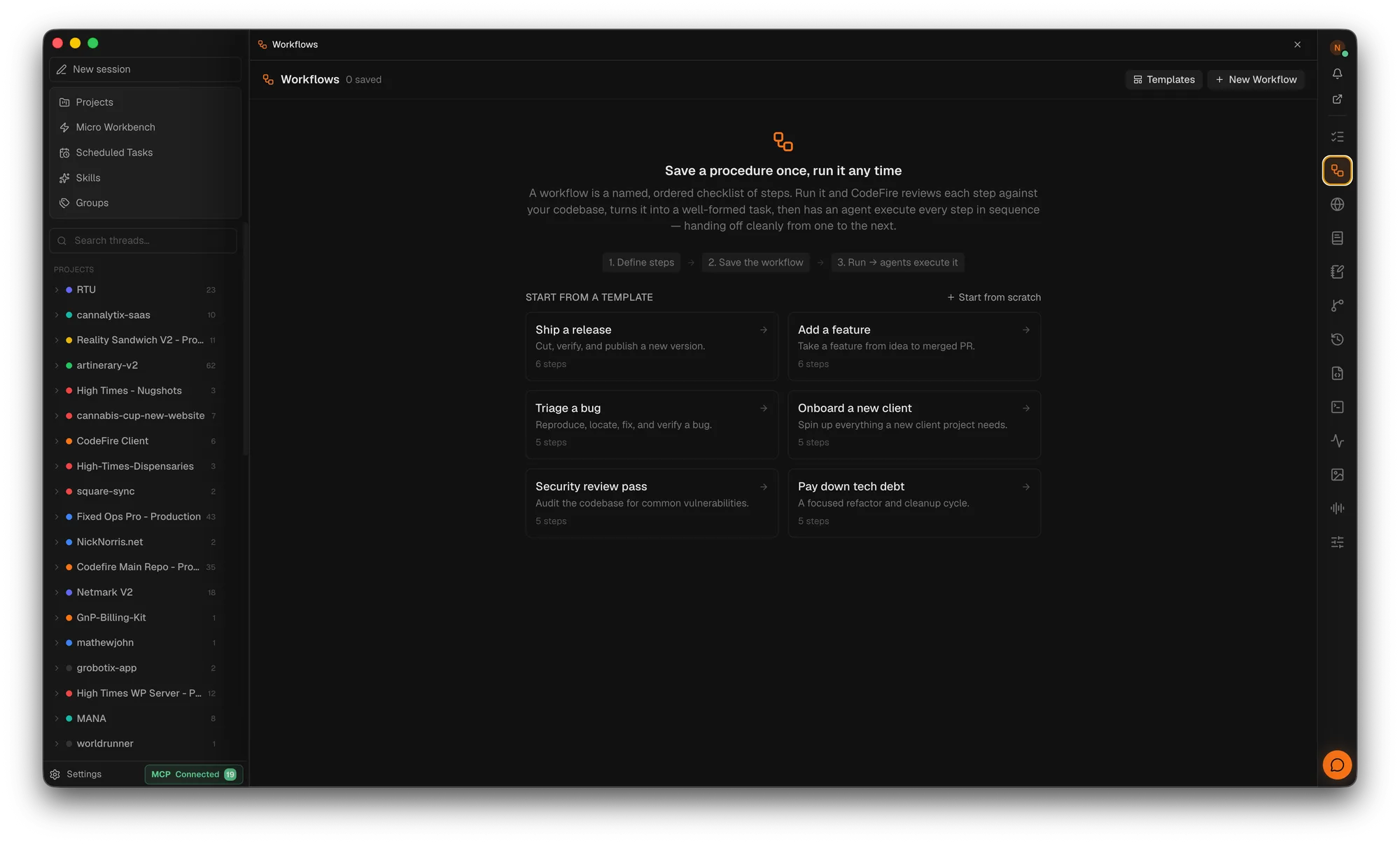
01 — Workflows & Pipelines
Pipelines, not prompt chains.
Save a procedure once, run it any time — "Onboard a new client", "Ship a release", "Security review pass" — and agents execute every step in sequence. Or compose multi-agent pipelines: plan with one agent, implement with another, verify with a third, each step routed to the CLI best suited for it.
Hand a running conversation from one CLI to another — or to a human teammate — with context, model selection, and task state carried over. A live agent census shows every running agent across every client project, so nothing works in the dark.
Live agent censusfrom:claude → to:codexApprove / re-targetShared task notes
03 — Context Engine
Surgical retrieval, not file dumps.
Hybrid vector + keyword search across functions, classes, blocks, docs, and git commits — exposed to your agent as context_search. Stale results never block; the index re-verifies in the background after sessions and on a scheduler.
Vector + FTSGit history awareWiki + code rankedBackground refresh
The task board
Every client, on one board.
Kanban that fills itself. Work you hand off in Team Chat is tracked automatically — every agent run attaches to a task, so client requests never evaporate into a chat log. Pull in work from email and mobile capture, then watch agents move cards to Done.
→ Tasks auto-created and tracked from Team Chat
→ Global Kanban across every tracked project
→ Staging inbox from Gmail and mobile capture
→ Stale-task cleanup with a full audit trail
Agent chat
Pick an agent. Startworking.
Launch a real Claude Code, Codex, Kimi Code, or CodeFire Agent session against the open project — supervised, streamed, and scoped to the folder you chose. Set permissions per session, define custom agents with their own instructions and models, and hand work off without leaving the app.
Claude Code Codex Kimi Code CodeFire Agent
→ Per-session permission mode: Ask · Plan · Auto edits · Full access
→ External context folders you can attach on the fly
→ Output streams back into chat — replayable
Wiki memory
The brief that survives
every session.
Architecture decisions, launch runbooks, client gotchas, glossaries — written once and read by every future session, on every teammate's machine. CodeFire seeds the structure from your repo, agents author through MCP, and freshness metadata flags pages that drift. New developer on the account? The brief is already written.
CodeFire spawns the actual CLI binaries you'd run in your terminal — no wrappers, no scraping. Tool calls, shell commands, and assistant turns stream into the chat panel as they happen, ready for you to approve, pause, or pivot.
→ Approval prompts surfaced inline — not buried in a TTY
→ Per-project defaults for agent, permissions, and context
→ Full session transcripts saved and searchable
MCP server
126 tools. One protocol.
Every CodeFire surface — wiki, tasks, notes, sessions, context search, browser, terminal, images, workflows, git, agent handoffs — is exposed to your CLI through a single MCP server. Agents don't just read your codebase; they update the project's shared brain.
Branded, letterhead PDF reports built from the work itself. Completed tasks become an invoice ledger with AI hour estimates, rates, tax, and Net-30 terms — or roll the whole portfolio up by client, by developer, or by team, on a schedule.
→ Branded letterhead orgs — logo, address, accent color
→ Invoices from completed tasks with AI hour estimates
→ Portfolio roll-ups: by client · by developer · by team
→ Scheduled weekly, monthly, or yearly PDF generation
Connect Google
Your clients' numbers, on tap.
Connect Google once and assign GA4 properties and Search Console sites to each client project. Analytics report recipes turn them into executive summaries, KPI scorecards, and trend tables — and your agents can query the same data through MCP. Credentials stay encrypted on your machine, never exposed to agents.
→ GA4 traffic, engagement, and top pages per project
→ Search Console queries, clicks, and positions
→ PageSpeed audits with ranked opportunities
→ Gmail to tasks · Calendar agenda with Meet links
CodeFire Capture · mobile companion
Your agents, in your pocket.
CodeFire Capture mirrors your agent chat to your phone. Watch runs stream live, capture tasks and ideas from anywhere, and steer an in-flight agent from the couch — the desktop stays the source of truth.
→ Live mirror of agent chat, run status, and approvals
→ Capture tasks on the go — they land in your staging inbox
→ Remote control is opt-in, per device, and revocable
Chapter IV · And the rest of your dev stack
Browser. Terminal. Git.Images.
CodeFire isn't only a memory layer — it's a desktop dev environment for the agentic era. The things you'd normally tab between, in one window your agents can also reach.
Claude Code, Codex, Kimi Code, and the built-in CodeFire Agent run as first-class in-app agent chats with live handoffs between them. Any other MCP-aware CLI still gets full access to the 126-tool MCP server.
Any other MCP-aware agent connects through the same 126-tool MCP server — setup guide.
Chapter VI · Get CodeFire
Download it. Light the fire.
Free and MIT licensed. Signed, notarized builds straight from GitHub Releases — updates are checked there too, never silently installed.
download codefireStep 1
Grab the latest release for your platform. macOS builds are signed and notarized — no Gatekeeper hoops. Apple Silicon only; Linux ships x86_64 and arm64.
Yes. CodeFire is MIT licensed and free to download. There is no telemetry — your projects, tasks, and wiki live in a local SQLite database on your machine.
Which AI coding agents does CodeFire support?
Claude Code, Codex, Kimi Code, and the built-in CodeFire Agent run as first-class in-app agent chats with live handoffs between them. Any other MCP-aware CLI can connect through the bundled 126-tool MCP server.
Can CodeFire manage multiple clients and projects?
Yes. Projects group by client, the dashboard shows every board, open task, and live agent at once, and portfolio reports roll up completed work by client, by developer, or by team — exportable as branded PDFs.
How does Team Chat with agents work?
Every project gets Slack-style channels where humans and agents share the room. Mention an agent — or a saved agent team — and CodeFire routes the work, tracks it as a task, and posts the live run inline with approvals and threads. Shared agent teams sync to every teammate.
Does CodeFire run on Intel Macs?
The macOS build is Apple Silicon (arm64) only. On Linux, both x86_64 and arm64 are supported via AppImage and .deb packages.
When is the Windows version coming?
A Windows build is in the works. and we will email you the moment it ships.
Does CodeFire collect telemetry?
No. CodeFire collects zero telemetry. Everything is local-first; team cloud sync is optional and off by default.
What is the CodeFire MCP server?
CodeFire bundles an MCP server that exposes 126 tools — context search, wiki, tasks, notes, sessions, browser automation, terminal, images, workflows, git, and agent handoffs — to any MCP-aware coding agent.
Built by an agency that runsagents on every clientand got tired of re-briefing all of them.